

As GPU servers get denser, air cooling is reaching its limits. A modern 8-GPU training server can draw well over 10 kW, and a full rack of them can exceed what traditional computer room air conditioning was designed to remove. Liquid cooling moves heat away with water or coolant instead of air, which lets you run more GPUs per rack, keep them at stable temperatures and often reduce cooling energy. This guide explains the main types of liquid cooling for GPU servers, when you actually need it, and what to plan before you buy.
Why GPU servers are moving to liquid cooling
Air can only carry a limited amount of heat. As accelerators climb from a few hundred watts to around a kilowatt each, fans have to spin faster, server rooms have to push more cold air, and rack density is capped by airflow rather than floor space. Liquid carries heat far more efficiently, so the same rack can host more compute without hot spots.
- Higher rack density: liquid-cooled racks can support far more power per rack than typical air-cooled designs, which matters when you plan large training clusters. See our guide to GPU server power requirements for how to estimate kW per rack.
- Stable performance: GPUs reduce clock speeds when they get too hot. Better cooling helps them sustain performance during long training runs.
- Lower cooling energy: removing heat at the chip with warm water is usually more efficient than chilling an entire room.
- Less noise and fan power: servers need fewer and slower fans.
Types of liquid cooling for GPU servers
| Type | How it works | Typical use |
|---|---|---|
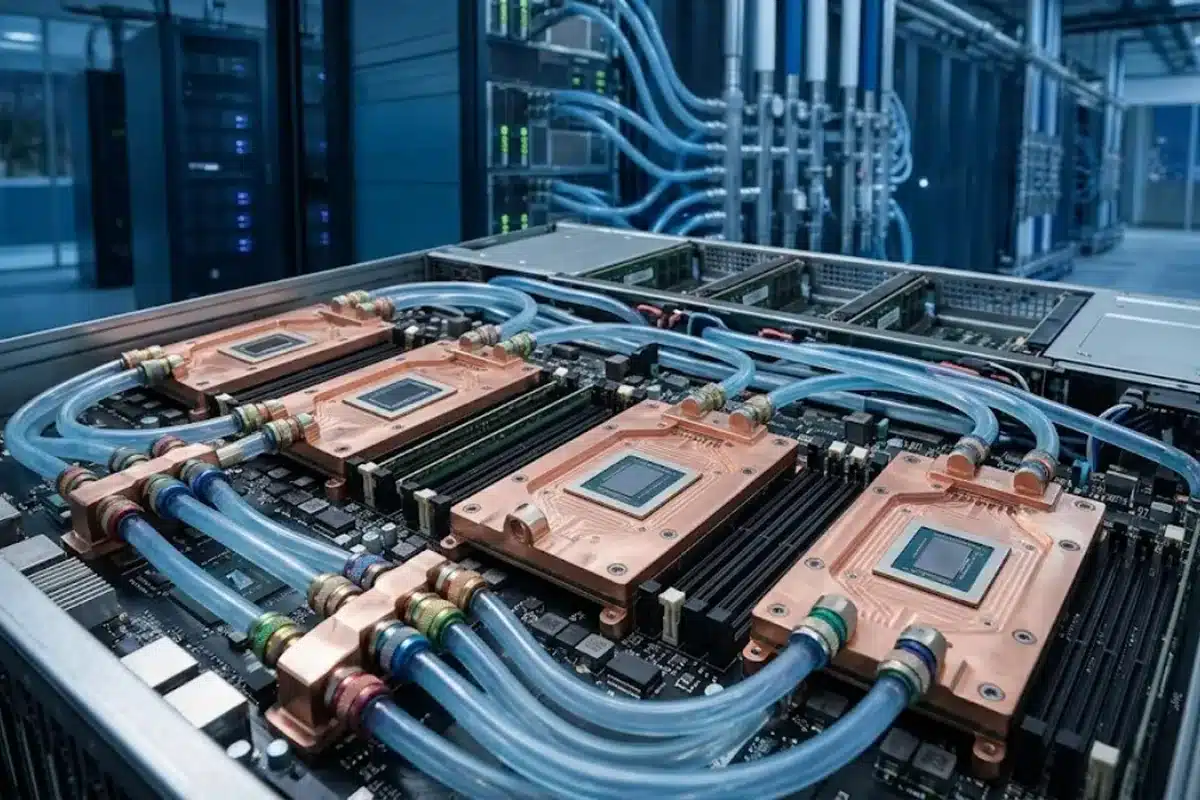
| Direct-to-chip (cold plate) | Metal cold plates sit on the GPUs and CPUs; coolant flows through them and carries heat to a coolant distribution unit (CDU) | The most common approach for high-density GPU servers |
| Rear-door heat exchanger | A liquid-cooled radiator replaces the rack’s rear door and cools the hot exhaust air | Upgrading existing air-cooled racks without changing servers |
| Single-phase immersion | Servers are submerged in a non-conductive fluid that is pumped through a heat exchanger | Very high density, specialised facilities |
| Two-phase immersion | The fluid boils at the chip surface and condenses on a coil | Niche deployments with specialised fluids and tanks |
Most buyers choosing new high-end GPU servers today are deciding between air cooling and direct-to-chip liquid cooling. Rear-door heat exchangers are a useful middle step for existing rooms, and immersion is usually considered only for purpose-built facilities.
When do you actually need liquid cooling?
Not every GPU deployment needs it. Use these questions as a starting point:
- How much power per rack? If your planned racks stay within the power and cooling your room already supports, air-cooled servers are usually simpler and cheaper.
- Which GPU platform? Some of the densest current platforms are designed mainly or only for liquid cooling, while PCIe GPU servers generally remain air-cooled. Our comparison of NVLink vs PCIe GPU servers explains why the dense SXM/HGX systems draw more power.
- How many servers? A single 8-GPU server can often be air-cooled in a well-designed room. A cluster of dozens usually changes the economics.
- Is the facility ready? Liquid cooling needs water supply, a CDU, leak detection and staff who can maintain it.
What to plan before you buy
- Confirm facility support: ask your data center or colocation provider whether they support direct liquid cooling, which water temperature they supply, and how much power per rack they allow.
- Choose the CDU approach: in-rack CDUs suit small deployments; row-level or facility CDUs suit larger clusters.
- Plan for leaks and maintenance: check leak detection, drip trays, quick-disconnect fittings and the procedure for swapping a server.
- Keep some air cooling: even liquid-cooled servers still have components such as memory, drives and power supplies that rely partly on air.
- Check warranty and support terms: confirm who supports the cooling loop, the servers and the integration between them.
- Model the total cost: include facility work, CDUs, coolant, maintenance and energy savings, not just the server price.

Common mistakes
- Buying liquid-cooled servers before confirming the facility can connect them.
- Planning rack power without matching cooling capacity, or the other way round.
- Ignoring maintenance: coolant quality, filters and fittings need regular checks.
- Assuming liquid cooling removes all air handling needs in the room.
- Overlooking the network and power design of the wider cluster. More pitfalls are covered in our article on GPU cluster mistakes.
Frequently asked questions
Is liquid cooling safe for servers?
Direct-to-chip systems use sealed loops, dripless quick-disconnects and leak detection. Immersion systems use non-conductive fluids. Like any infrastructure, they need correct installation and regular maintenance.
Can I add liquid cooling to existing air-cooled GPU servers?
Usually not at the server level, because cold plates must be designed for the specific platform. A rear-door heat exchanger is the common way to add liquid cooling to existing racks.
Does liquid cooling make GPUs faster?
It does not increase the GPU’s rated performance, but it helps GPUs avoid thermal throttling and sustain performance during long, heavy workloads.
Do I need liquid cooling for a single GPU server?
In most cases, no. A single air-cooled GPU server can run in a properly cooled server room. Liquid cooling becomes important as rack density and cluster size grow.
What is a CDU?
A coolant distribution unit circulates coolant through the servers’ cold plates and transfers the heat to the facility water loop, while controlling flow, pressure and temperature.
Conclusion
Liquid cooling is becoming standard for the densest GPU servers and large AI clusters, but it is not required for every deployment. Start with your power per rack, the GPU platform you plan to use and what your facility can support. If you are planning a GPU server purchase or cluster build, the ITCT team can help you compare air-cooled and liquid-cooled options for your workload and environment.
Last update at December 2025