
NVIDIA A100 40GB Tensor Core GPU: Complete Professional Guide
| Specification | NVIDIA A100 40GB PCIe | Details |
|---|---|---|
| GPU Architecture | NVIDIA Ampere (GA100) | 7nm manufacturing process |
| CUDA Cores | 6,912 | Parallel processing units |
| Tensor Cores | 432 (3rd Generation) | AI-optimized compute units |
| GPU Memory | 40GB HBM2e | High-bandwidth memory with ECC |
| Memory Interface | 5120-bit | Ultra-wide memory bus |
Price:
USD14,500 Original price was: USD14,500.USD12,800Current price is: USD12,800.
Description
The NVIDIA A100 40GB Tensor Core GPU represents a revolutionary leap in data center acceleration technology. Built on the groundbreaking NVIDIA Ampere architecture, this enterprise-grade graphics processing unit delivers unprecedented performance for artificial intelligence, machine learning, deep learning, and high-performance computing workloads. Whether you’re training complex neural networks, running inference at scale, or conducting scientific simulations, the A100 40GB provides the computational horsepower needed for demanding enterprise applications.
As organizations worldwide accelerate their digital transformation initiatives, the A100 40GB has become the gold standard for AI infrastructure. With its revolutionary Multi-Instance GPU technology, third-generation Tensor Cores, and massive memory bandwidth, this GPU transforms how businesses approach computational challenges.
Technical Specifications: Understanding the A100 40GB Architecture
Core Performance Specifications
The NVIDIA A100 40GB delivers exceptional computational capabilities through its advanced architecture:
| Specification | NVIDIA A100 40GB PCIe | Details |
|---|---|---|
| GPU Architecture | NVIDIA Ampere (GA100) | 7nm manufacturing process |
| CUDA Cores | 6,912 | Parallel processing units |
| Tensor Cores | 432 (3rd Generation) | AI-optimized compute units |
| GPU Memory | 40GB HBM2e | High-bandwidth memory with ECC |
| Memory Interface | 5120-bit | Ultra-wide memory bus |
| Memory Bandwidth | 1,555 GB/s | Exceptional data throughput |
| FP32 Performance | 19.5 TFLOPS | Single-precision computing |
| FP64 Performance | 9.7 TFLOPS | Double-precision computing |
| Tensor Performance (FP16) | 312 TFLOPS | AI training acceleration |
| INT8 Tensor Performance | 624 TOPS | Inference optimization |
| TDP | 250W | Thermal design power |
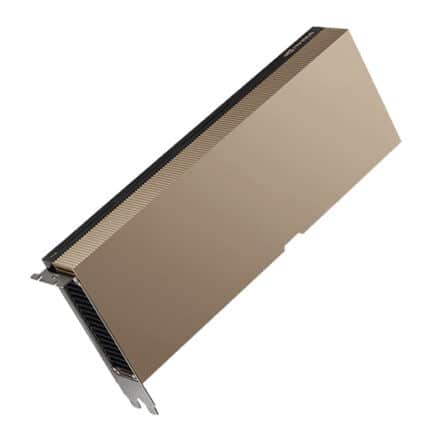
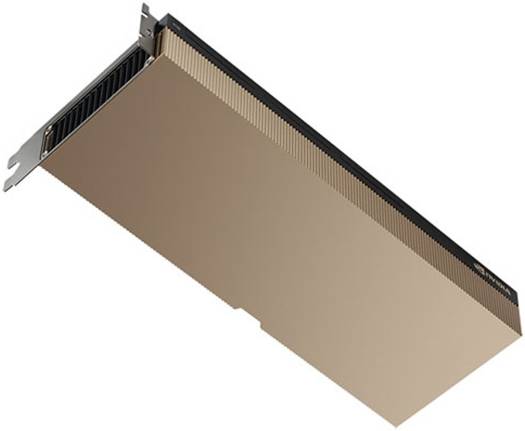
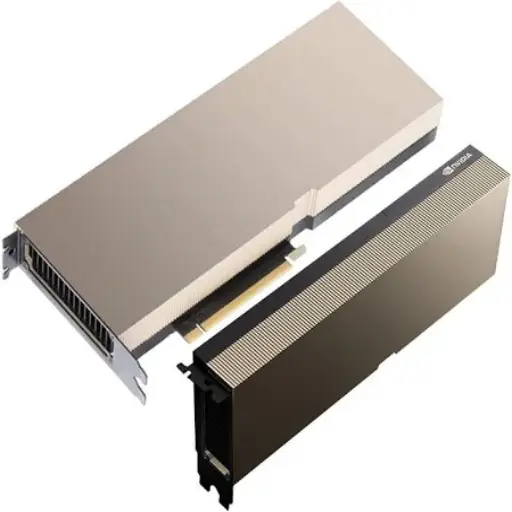
| Form Factor | Dual-Slot PCIe | Standard server compatibility |
| Interface | PCIe 4.0 x16 | Latest PCIe generation |
| NVLink | 600 GB/s (12 links) | Multi-GPU connectivity |
Ampere Architecture: The Technology Behind the Performance
The NVIDIA Ampere architecture introduces groundbreaking innovations that set the A100 apart from previous generations:
Third-Generation Tensor Cores: These specialized processing units deliver up to 20X higher performance compared to the previous Volta generation. The new Tensor Cores support multiple precision formats including TF32, FP16, BF16, FP64, and INT8, enabling optimal performance across diverse workloads.
Structural Sparsity: The A100 leverages fine-grained structured sparsity in deep learning networks to deliver up to 2X higher performance for inference workloads without sacrificing accuracy.
Multi-Instance GPU (MIG): This revolutionary technology allows a single A100 to be partitioned into up to seven independent GPU instances, each with dedicated memory, cache, and compute resources. This enables optimal GPU utilization and quality of service guarantees for multi-tenant environments.
Performance Benchmarks: Real-World Results
Deep Learning Training Performance
The A100 40GB excels at training large-scale AI models:
- Up to 3X faster training on deep learning recommendation models (DLRM) compared to V100
- 20X higher performance over previous generation Volta architecture
- 2.17X faster than V100 for 32-bit training workloads
- Training BERT-Large models at unprecedented speeds with automatic mixed precision
AI Inference Acceleration
For production inference deployments, the A100 40GB delivers exceptional throughput:
- Up to 249X higher performance compared to CPU-only inference
- 7X higher throughput with Multi-Instance GPU technology
- INT8 precision with structural sparsity for maximum efficiency
- Optimal for conversational AI, computer vision, and recommendation systems
High-Performance Computing
Scientific computing applications benefit dramatically from the A100’s capabilities:
- 11X higher HPC performance compared to four-year-old systems
- Double-precision Tensor Cores for scientific simulations
- Up to 19.5 TFLOPS FP64 Tensor Core performance
- Accelerates quantum chemistry, molecular dynamics, and weather modeling
Data Analytics Performance
Big data workloads experience significant acceleration:
- 2X faster than CPU-based analytics on 10TB datasets
- Native support for RAPIDS acceleration libraries
- GPU-accelerated Apache Spark integration
- Real-time analytics on massive datasets
Key Features and Technologies
Multi-Instance GPU (MIG): Maximizing Utilization
Multi-Instance GPU technology is one of the A100’s most innovative features. MIG enables:
- Partitioning into up to 7 instances: Each with 5GB of dedicated memory
- Hardware-level isolation: Guaranteed quality of service per instance
- Flexible resource allocation: Right-size GPU resources for each workload
- Enterprise-ready: Full support for Kubernetes, containers, and virtualization
- Improved ROI: Run multiple smaller workloads simultaneously on a single GPU
This technology transforms GPU economics by allowing organizations to consolidate workloads while maintaining performance isolation and security boundaries.
Advanced Memory Architecture
The 40GB HBM2e memory subsystem provides:
- 1,555 GB/s bandwidth: Eliminates memory bottlenecks
- ECC protection: Enterprise-grade reliability for mission-critical applications
- 5120-bit memory interface: Unprecedented data access speeds
- Unified memory addressing: Simplified programming model
NVLink and Multi-GPU Scalability
For workloads requiring extreme performance, the A100 supports:
- NVLink interconnect: 600 GB/s bidirectional bandwidth
- Multi-GPU configurations: Scale to thousands of GPUs
- NVIDIA NVSwitch: Enables all-to-all GPU communication
- GPU-Direct RDMA: Direct GPU-to-GPU data transfer over InfiniBand
Use Cases and Applications
Artificial Intelligence and Machine Learning
The A100 40GB excels across the entire AI pipeline:
Deep Learning Training:
- Large language models (BERT, GPT, T5)
- Computer vision networks (ResNet, EfficientNet, YOLO)
- Recommendation systems and collaborative filtering
- Generative adversarial networks (GANs)
- Reinforcement learning environments
AI Inference:
- Real-time natural language processing
- Video analytics and object detection
- Speech recognition and synthesis
- Medical image analysis
- Autonomous vehicle perception systems
High-Performance Computing
Scientific research applications leverage the A100 for:
- Quantum chemistry simulations (Quantum Espresso, VASP)
- Molecular dynamics (GROMACS, NAMD, Amber)
- Computational fluid dynamics
- Weather and climate modeling
- Genomics and bioinformatics
- Financial risk modeling and portfolio optimization
Data Science and Analytics
Data-intensive workloads benefit from GPU acceleration:
- Large-scale data processing with RAPIDS
- GPU-accelerated Apache Spark analytics
- Real-time fraud detection
- Customer behavior analysis
- Time-series forecasting
- Graph analytics and network analysis
Comparison: A100 vs Previous Generation GPUs
NVIDIA A100 vs V100: Performance Evolution
Understanding the generational improvements helps justify the upgrade:
| Feature | NVIDIA V100 32GB | NVIDIA A100 40GB | Performance Gain |
|---|---|---|---|
| Architecture | Volta | Ampere | Next generation |
| CUDA Cores | 5,120 | 6,912 | +35% |
| Tensor Cores | 640 (2nd Gen) | 432 (3rd Gen) | 2X throughput per core |
| GPU Memory | 32GB HBM2 | 40GB HBM2e | +25% capacity |
| Memory Bandwidth | 900 GB/s | 1,555 GB/s | +73% |
| FP32 Performance | 15.7 TFLOPS | 19.5 TFLOPS | +24% |
| Tensor Performance (FP16) | 125 TFLOPS | 312 TFLOPS | +150% |
| Multi-Instance GPU | Not supported | Up to 7 instances | New feature |
| PCIe Generation | PCIe 3.0 | PCIe 4.0 | 2X bandwidth |
Key Advantages of A100 over V100:
- 2-3X faster AI training on large models
- Up to 20X higher Tensor Core performance
- Multi-Instance GPU for improved utilization
- Structural sparsity support for inference acceleration
- PCIe 4.0 for faster host-GPU communication
- Larger memory capacity for bigger models and datasets
The A100 represents a transformational upgrade, delivering approximately 2X performance improvement in real-world AI workloads compared to the V100, as confirmed by independent benchmarks from Lambda Labs and various research institutions.
Software Ecosystem and Framework Support
Deep Learning Frameworks
The A100 40GB enjoys comprehensive support across all major AI frameworks:
- TensorFlow: Full Tensor Core utilization with automatic mixed precision
- PyTorch: Native AMP support and CUDA optimization
- NVIDIA TensorRT: Optimized inference engine with INT8 quantization
- ONNX Runtime: Cross-framework model deployment
- JAX: High-performance numerical computing
- MXNet: Scalable deep learning framework
NVIDIA Software Stack
Maximize A100 performance with NVIDIA’s comprehensive software suite:
- CUDA Toolkit 11+: Latest GPU computing platform
- cuDNN: Optimized deep learning primitives
- NCCL: Multi-GPU communication library
- RAPIDS: GPU-accelerated data science libraries
- NGC Catalog: Pre-trained models and containers
- Triton Inference Server: Production deployment platform
HPC Applications
Pre-optimized applications available through NGC:
- Quantum chemistry: Gaussian, VASP, Quantum Espresso
- Molecular dynamics: GROMACS, NAMD, Amber, LAMMPS
- Computational fluid dynamics: OpenFOAM, ANSYS Fluent
- Weather modeling: WRF, MPAS
- Seismic processing: RTM, FWI
Deployment Options and System Integration
Form Factors Available
The A100 40GB comes in multiple configurations:
PCIe Form Factor:
- Standard PCIe 4.0 x16 interface
- Dual-slot passive cooling design
- Compatible with standard servers
- 250W TDP
- Ideal for existing infrastructure upgrades
SXM4 Form Factor:
- Optimized for NVIDIA HGX platforms
- 400W TDP for maximum performance
- Direct NVLink connectivity
- Liquid cooling support
- Best for purpose-built AI systems
Server Compatibility
The A100 PCIe 40GB integrates seamlessly with enterprise servers from leading manufacturers:
- Dell PowerEdge servers (R750xa, R7525)
- HPE ProLiant servers (DL380 Gen10+)
- Lenovo ThinkSystem servers (SR670 V2)
- Supermicro GPU servers
- Cisco UCS servers
Ensure your server meets these requirements:
- PCIe 4.0 slots (backward compatible with PCIe 3.0)
- Minimum 250W power delivery per GPU
- Adequate cooling capacity
- Compatible CPU and chipset
Multi-GPU Configurations
Scale performance with multiple A100 GPUs:
- 2-GPU setups: Ideal for mid-size AI workloads
- 4-GPU configurations: Common for training clusters
- 8-GPU systems: Maximum density for HGX platforms
- DGX A100: NVIDIA’s flagship 8-GPU system with NVSwitch
Installation and Configuration Best Practices
Hardware Installation Steps
Follow these guidelines for optimal A100 deployment:
- Power Planning: Verify PSU capacity (minimum 250W per GPU plus system overhead)
- Cooling Assessment: Ensure adequate airflow (passive cooling design requires proper chassis ventilation)
- PCIe Slot Selection: Use CPU-direct PCIe 4.0 x16 slots for best performance
- Physical Installation: Secure GPU with both bracket and retention mechanism
- Power Connections: Attach 8-pin PCIe power connectors firmly
Driver and Software Setup
Optimize your A100 with proper software configuration:
- NVIDIA Driver Installation: Use version 470.xx or newer
- CUDA Toolkit: Install CUDA 11.0 or later for full feature support
- Fabric Manager: Required for multi-GPU NVLink configurations
- MIG Configuration: Enable MIG mode if partitioning is needed
- Monitoring Tools: Deploy nvidia-smi, DCGM for health monitoring
Performance Optimization Tips
Maximize A100 utilization with these best practices:
- Enable Tensor Cores: Use TF32 precision for automatic acceleration
- Implement Mixed Precision: Leverage AMP for 2-3X training speedup
- Optimize Batch Sizes: Larger batches maximize GPU utilization
- Use NVIDIA Libraries: cuDNN, cuBLAS, NCCL for optimized operations
- Profile Workloads: Use NVIDIA Nsight Systems for bottleneck identification
- Configure MIG Appropriately: Right-size instances based on workload requirements
Cost Analysis and ROI Considerations
Total Cost of Ownership
When evaluating the A100 40GB investment, consider:
Direct Costs:
- GPU hardware acquisition
- Server infrastructure (if new deployment)
- Power and cooling infrastructure upgrades
- Software licenses (if applicable)
Operational Costs:
- Electricity consumption (250W TDP)
- Cooling and facilities
- IT administration and maintenance
- Training and onboarding
Cost Savings:
- Reduced training time (faster time-to-market)
- Lower inference costs (higher throughput per watt)
- Improved GPU utilization (MIG technology)
- Consolidation opportunities (replace multiple older GPUs)
ROI Calculation Example
Consider a deep learning training scenario:
Without A100:
- V100 GPU training time: 10 hours per model
- Cost per hour: $2.50
- Total: $25 per training run
With A100:
- A100 training time: 4-5 hours per model
- Cost per hour: $3.00
- Total: $12-15 per training run
- Savings: 40-50% reduction in compute costs
For organizations running hundreds of training jobs monthly, the A100’s faster performance delivers substantial cost savings and accelerated innovation cycles.
Industry Applications and Case Studies
Healthcare and Life Sciences
Medical research institutions leverage A100 40GB for:
- Medical Imaging: CT scan analysis, MRI reconstruction, pathology slide examination
- Drug Discovery: Molecular modeling, protein folding prediction, compound screening
- Genomics: Variant calling, genome assembly, gene expression analysis
- Clinical AI: Disease prediction models, treatment recommendation systems
Real-World Impact: Research teams report 5-10X faster training of medical imaging models, enabling rapid deployment of diagnostic AI systems.
Financial Services
Banks and financial institutions use A100 for:
- Risk Analysis: Portfolio optimization, credit risk modeling, stress testing
- Fraud Detection: Real-time transaction monitoring, anomaly detection
- Algorithmic Trading: High-frequency trading strategy optimization
- Customer Analytics: Churn prediction, personalization engines
Business Value: Financial firms achieve sub-millisecond inference latency for fraud detection, preventing millions in losses.
Automotive and Transportation
Automotive companies deploy A100 40GB for:
- Autonomous Driving: Perception model training, sensor fusion algorithms
- Simulation: Virtual testing environments, scenario generation
- Predictive Maintenance: Fleet health monitoring, failure prediction
- Traffic Optimization: Route planning, congestion prediction
Innovation Acceleration: Autonomous vehicle developers train perception models 3X faster, accelerating safety validation cycles.
Energy and Manufacturing
Industrial applications include:
- Predictive Maintenance: Equipment failure prediction, anomaly detection
- Process Optimization: Production efficiency modeling, quality control
- Seismic Analysis: Oil and gas exploration data processing
- Smart Grid: Energy demand forecasting, distribution optimization
Operational Excellence: Manufacturing plants reduce downtime by 30% through AI-powered predictive maintenance using A100-accelerated models.
Management and Monitoring
GPU Health Monitoring
Maintain optimal A100 performance with proactive monitoring:
NVIDIA Management Tools:
- nvidia-smi: Command-line monitoring and management
- DCGM (Data Center GPU Manager): Enterprise-grade monitoring
- GPU Operator: Kubernetes-native GPU management
- Base Command Manager: Cluster-level orchestration
Key Metrics to Monitor:
- GPU utilization percentage
- Memory utilization and allocation
- Temperature and power consumption
- ECC error rates
- PCIe throughput
- NVLink bandwidth (multi-GPU setups)
Troubleshooting Common Issues
Address potential challenges effectively:
Performance Issues:
- Check PCIe link speed (should be Gen4 x16)
- Verify driver version compatibility
- Monitor thermal throttling
- Analyze workload efficiency with profiling tools
Memory Errors:
- Review ECC error logs
- Verify memory integrity with diagnostics
- Check for memory leaks in applications
- Ensure adequate cooling
Multi-GPU Problems:
- Verify NVLink connectivity
- Check peer-to-peer access configuration
- Validate NCCL communication patterns
- Review topology with nvidia-smi topo
Security and Compliance
Enterprise Security Features
The A100 40GB includes robust security capabilities:
- Secure Boot: Firmware integrity verification
- Hardware Root of Trust: Cryptographic device authentication
- Memory Encryption: Protect sensitive data in GPU memory
- MIG Isolation: Hardware-enforced workload separation
- Confidential Computing: Support for encrypted computation
Compliance Considerations
For regulated industries, the A100 supports:
- FIPS 140-2: Cryptographic module validation
- Common Criteria: Security certification
- HIPAA: Healthcare data protection (with proper configuration)
- PCI-DSS: Payment card industry standards
- SOC 2: Service organization controls
Environmental and Sustainability
Energy Efficiency
The A100 40GB delivers exceptional performance per watt:
- 250W TDP: Balanced performance and efficiency
- Up to 20X better performance per watt vs. CPUs for AI workloads
- Dynamic power management: Scales power based on workload
- MIG efficiency: Run multiple workloads without full GPU power
Green Computing Impact
Organizations reduce their carbon footprint by:
- Consolidating workloads: Replace multiple older GPUs with fewer A100s
- Faster training: Reduced overall energy consumption per model
- Efficient inference: Higher throughput means fewer GPUs needed in production
- Data center optimization: Improved compute density reduces facility energy
Future-Proofing Your Investment
Longevity and Upgrade Path
The A100 40GB remains relevant through:
Continuous Software Improvements:
- Regular driver updates with performance optimizations
- New framework versions leveraging latest features
- Expanding NGC catalog of optimized applications
- Community contributions and optimizations
Scalability Options:
- Add more A100 GPUs as workloads grow
- Upgrade to A100 80GB for larger models
- Integrate with newer GPUs in heterogeneous clusters
- Cloud hybrid strategies for burst capacity
Industry Support:
- Active NVIDIA developer ecosystem
- Long-term driver support commitment
- Extensive documentation and resources
- Strong third-party tool support
Purchase Considerations at ITCT Shop
Why Choose ITCT Shop for Your A100 40GB
When purchasing your NVIDIA A100 40GB from itctshop.com, you benefit from:
Product Authenticity:
- Genuine NVIDIA-certified hardware
- Full manufacturer warranty support
- Verified supply chain sourcing
- Original packaging and documentation
Expert Support:
- Technical consultation for deployment planning
- Configuration assistance and optimization guidance
- Post-purchase support and troubleshooting
- Integration recommendations
Competitive Advantages:
- Competitive pricing for enterprise customers
- Flexible payment and leasing options
- Volume discounts for multi-GPU purchases
- Fast shipping and logistics support
Value-Added Services:
- Pre-installation testing and validation
- Custom configuration services
- Driver and software setup assistance
- Integration with existing infrastructure planning
Product Warranty and Support
Your A100 40GB purchase includes:
- Manufacturer Warranty: Standard NVIDIA warranty coverage
- Extended Support Options: Available for enterprise deployments
- RMA Process: Streamlined return and replacement procedures
- Technical Assistance: Direct access to GPU specialists
Related Products at ITCT Shop
Complement your A100 40GB with:
- High-Performance Server Systems: Pre-configured GPU servers
- Enterprise NVMe Storage: Fast storage for AI datasets
- Networking Equipment: InfiniBand and high-speed Ethernet
- Cooling Solutions: Thermal management for GPU clusters
- GPU Accessories: NVLink bridges, power cables, mounting hardware
Frequently Asked Questions
Q1: What is the difference between A100 40GB and A100 80GB?
The primary difference is memory capacity. The A100 80GB offers double the GPU memory (80GB vs 40GB) and slightly higher memory bandwidth (2,039 GB/s vs 1,555 GB/s). The 80GB version is ideal for extremely large models like GPT-3 scale networks, while the 40GB version handles most enterprise AI workloads efficiently at a lower cost point. For most applications including training models up to several billion parameters, the 40GB version provides excellent performance.
Q2: Can the A100 40GB be used for gaming or graphics workstation applications?
While technically capable, the A100 is designed and optimized for data center AI and HPC workloads, not gaming or traditional graphics rendering. For gaming or creative professional work, NVIDIA’s GeForce RTX or professional Quadro/RTX series GPUs are more appropriate and cost-effective choices. The A100 lacks display outputs and graphics-focused optimizations found in consumer and workstation GPUs.
Q3: How many A100 40GB GPUs do I need for training large language models?
Requirements vary by model size. As a general guideline: small models (up to 1B parameters) work well on 1-2 A100s; medium models (1-10B parameters) typically need 4-8 A100s; large models (10-100B parameters) require 16-64 A100s; and the largest models (100B+ parameters) demand hundreds of GPUs. Model architecture, batch size, and sequence length also impact GPU requirements. Consult NVIDIA’s model training guides or contact ITCT Shop specialists for specific recommendations.
Q4: What is Multi-Instance GPU (MIG) and when should I use it?
MIG allows partitioning a single A100 into up to seven independent GPU instances, each with dedicated memory and compute resources. Use MIG when: running multiple small inference workloads simultaneously, providing GPU access to multiple users with guaranteed quality of service, maximizing utilization for workloads that don’t require full GPU capacity, or implementing multi-tenant cloud environments. MIG is especially valuable for inference deployments and shared research clusters.
Q5: Is the A100 40GB compatible with my existing server infrastructure?
The A100 PCIe 40GB fits any server with a PCIe 4.0 x16 slot (also compatible with PCIe 3.0, though at reduced bandwidth). Verify your server has: adequate power delivery (250W per GPU plus 8-pin PCIe power connector), sufficient cooling capacity for passive-cooled GPUs, proper airflow design, and compatible BIOS/firmware. Most modern dual-socket servers from Dell, HPE, Lenovo, Supermicro, and Cisco support the A100. ITCT Shop offers compatibility verification services before purchase.
Q6: What is the typical lifespan and depreciation cycle for the A100 40GB?
Enterprise GPUs typically remain competitive for 3-5 years in production environments. The A100, released in 2020, continues to deliver excellent performance in 2024 and will remain relevant through 2025-2026 for most workloads. While newer architectures (like H100) offer higher performance, the A100’s strong software ecosystem, proven reliability, and lower acquisition cost make it a solid investment. Many organizations amortize GPU investments over 3-4 years.
Q7: How does the A100 40GB compare to newer H100 GPUs?
The H100 (Hopper architecture) offers approximately 2-3X higher performance than A100 for certain AI workloads, particularly transformer models. However, the A100 40GB remains highly competitive for most applications at a significantly lower price point. Choose A100 for: cost-sensitive deployments, proven workload compatibility, stable production environments, and applications not requiring cutting-edge performance. Choose H100 for: state-of-the-art LLM training, maximum inference throughput, or future-proofing for emerging workloads.
Q8: What software and tools are required to get started with the A100 40GB?
Essential software includes: NVIDIA Driver (version 470+), CUDA Toolkit (11.0+), cuDNN library for deep learning, your chosen framework (TensorFlow, PyTorch, etc.), and monitoring tools like nvidia-smi. NVIDIA provides comprehensive setup documentation, and many pre-configured Docker containers are available through the NGC catalog. ITCT Shop offers setup assistance and can provide pre-configured systems with all necessary software installed.
Q9: Can I mix A100 40GB with other GPU models in the same system?
Yes, you can install multiple different GPU models in the same server for different workloads. However, for multi-GPU training with frameworks like PyTorch or TensorFlow, it’s recommended to use identical GPUs for optimal performance and simplified configuration. Mixing GPU types works well for: dedicating different GPUs to different applications, running inference on older GPUs while training on A100s, or gradual infrastructure upgrades.
Q10: What are the power and cooling requirements for multi-GPU A100 configurations?
Each A100 PCIe 40GB consumes up to 250W, so plan accordingly: 2-GPU system requires ~1,200W PSU (including CPU and system overhead), 4-GPU system needs ~1,600-2,000W PSU, and 8-GPU configurations require specialized dual-PSU or high-wattage server power supplies (2,500W+). Cooling requirements increase proportionally. Multi-GPU servers should have optimized airflow designs with adequate intake and exhaust fans. ITCT Shop can recommend appropriate server configurations for your GPU density requirements.
Conclusion: Transforming AI Infrastructure with the A100 40GB
The NVIDIA A100 40GB Tensor Core GPU represents a cornerstone technology for enterprise AI and high-performance computing deployments. Its combination of raw computational power, architectural innovations like Multi-Instance GPU, and comprehensive software ecosystem makes it an exceptional choice for organizations serious about AI transformation.
Whether you’re training the next generation of AI models, deploying production inference systems, conducting scientific research, or analyzing massive datasets, the A100 40GB delivers the performance, flexibility, and reliability required for mission-critical workloads. Its proven track record across thousands of deployments worldwide, coupled with extensive software support and optimization, ensures your investment delivers lasting value.
At ITCT Shop, we understand that selecting the right GPU infrastructure is crucial to your success. Our team of specialists is ready to help you evaluate requirements, design optimal configurations, and deploy A100 40GB solutions that accelerate your AI initiatives. Visit itctshop.com today to explore our A100 40GB offerings and discover how we can support your journey to AI-powered innovation.
Ready to accelerate your AI workloads? Contact our experts at ITCT Shop for personalized consultation and competitive pricing on NVIDIA A100 40GB Tensor Core GPUs.
Last update at December 2025
Jack –
We deployed the A100 40GB in our training cluster for large scale NLP models. The performance uplift compared to V100 was immediately noticeable. Stable under continuous heavy load and memory bandwidth is excellent.
john –
This GPU handles both training and inference extremely well. Multi instance GPU (MIG) support is a big plus for us, allowing better resource utilization across multiple projects.
Robert Williams –
Enterprise grade GPU with serious power. If you are working with large datasets or complex models, this card delivers exactly what you expect from an enterprise level GPU. Power consumption is high, but performance per watt is still impressive.