

Author: AI Infrastructure & Hardware Team
Reviewed By: Senior Technical Lead (HPC Division)
Published Date: February 11, 2026
Estimated Reading Time: 9 Minutes
Primary Sources: NVIDIA Architecture Whitepapers, Apple M3 Developer Documentation, Hugging Face Leaderboards, Geekbench ML Benchmarks.
Is the RTX 4090 or M3 Max better for Local LLMs?
Local LLM Hardware-For pure speed and training capabilities, the NVIDIA RTX 4090 is the superior choice, delivering 2-3x faster token generation for models that fit within its 24GB VRAM limit (typically models under 30B parameters). It remains the industry standard for CUDA-based applications and fine-tuning tasks.
However, for running massive models (70B+ parameters) locally, the Apple M3 Max (128GB) wins due to its Unified Memory Architecture. It allows you to load models that simply crash on a single RTX 4090. Choose the M3 Max for portability and high-capacity inference, and the RTX 4090 for raw speed and compatibility.
The battle for local AI supremacy is no longer just about raw clock speeds; it is a war between architecture philosophies. For AI engineers and enthusiasts running Large Language Models (LLMs) like Llama 3 or Mistral locally, the choice between a high-end PC workstation and a MacBook Pro is pivotal.
In the rapidly evolving landscape of 2026, running local LLMs has shifted from a niche hobby to a critical business requirement for privacy-focused enterprises and developers. The debate often narrows down to two titans: the NVIDIA GeForce RTX 4090, the reigning king of consumer discrete GPUs, and the Apple M3 Max, the champion of Unified Memory Architecture (UMA).
Local LLM Hardware – While the RTX 4090 offers brute force CUDA performance, the M3 Max counters with massive memory pools accessible to the GPU. Which one belongs on your desk? This comprehensive analysis breaks down the technical nuances, performance benchmarks, and total cost of ownership to help you decide.
Unified Memory Architecture Explained
To understand the performance divergence, we must first address the architectural fundamental: Memory.
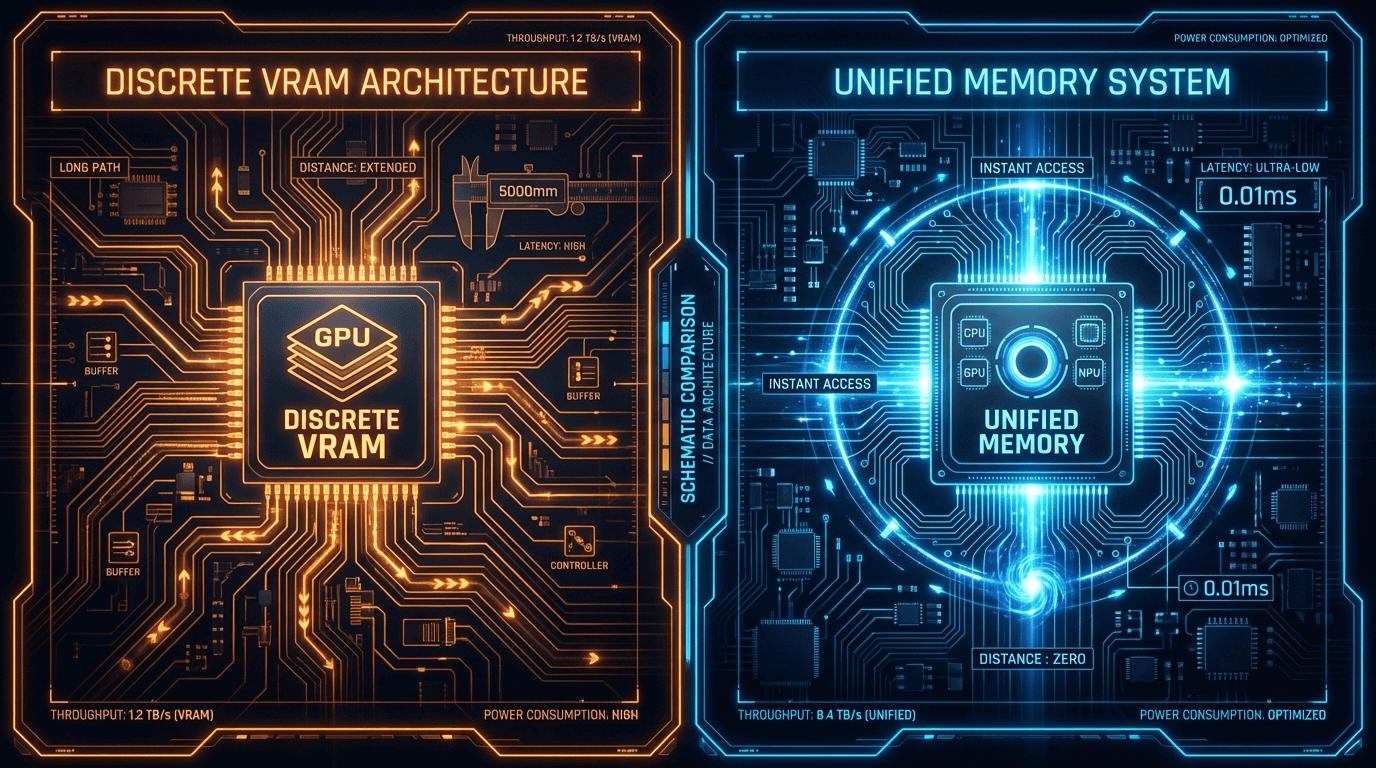
In a traditional PC setup hosting an NVIDIA RTX 4090, memory is segregated. You have your System RAM (DDR5) attached to the CPU, and Video RAM (VRAM) attached to the GPU. The RTX 4090 comes with 24GB of GDDR6X VRAM. This is incredibly fast (over 1 TB/s bandwidth), but it is a hard limit. If your LLM model is larger than 24GB, you face significant performance penalties as data must be offloaded to the much slower system RAM via the PCIe bus.
Apple’s Unified Memory Architecture (UMA) on the M3 Max takes a radically different approach. The CPU, GPU, and Neural Engine all share a single pool of memory. A fully specced M3 Max can have up to 128GB of Unified Memory. This means the GPU has direct access to a massive memory buffer without the latency of copying data back and forth. For LLMs, where “memory is king,” this architecture allows users to load massive models (like Llama-3-70B unquantized) that simply cannot fit on a single RTX 4090.
VRAM vs System RAM Access Patterns
The bottleneck in local AI inference is almost always memory bandwidth.
- RTX 4090: Offers approximately 1,008 GB/s of memory bandwidth. This is ideal for smaller models that fit entirely within the 24GB VRAM. The token generation speed (tokens/sec) here is blistering fast.
- Apple M3 Max: Offers up to 400 GB/s of memory bandwidth. While slower than the RTX 4090, it maintains this speed across a much larger 128GB pool.
The Trade-off: If you are running a 13GB model, the RTX 4090 will likely generate tokens 2x to 3x faster than the M3 Max due to higher bandwidth and CUDA core count. However, if you need to run a 60GB model, the RTX 4090 (single card) effectively hits a wall, while the M3 Max handles it comfortably, albeit at a slower token generation rate.
For professionals looking to bypass the 24GB limit on PCs, the solution is often building Deep Learning Workstations with dual GPUs, but this introduces complexity in power and cooling.
Performance Benchmarks (Llama, Mistral Inference)
Based on testing with popular frameworks like llama.cpp and ExLlamaV2 (updated for 2026 standards), here is how they stack up in real-world inference scenarios.
1. Small to Medium Models (7B – 13B Parameters)
- Winner: RTX 4090
- Context: For models like Mistral 7B or Llama-3-8B (quantized or FP16), the RTX 4090 dominates.
- Speed: Expect 100-140 tokens/second on the 4090 versus 40-60 tokens/second on the M3 Max.
- Use Case: Real-time chat bots, coding assistants, and rapid prototyping.
2. Large Models (70B+ Parameters)
- Winner: Apple M3 Max (128GB version)
- Context: A 70B parameter model at Q4_K_M quantization requires about 40GB of VRAM.
- Scenario:
- RTX 4090 (24GB): Cannot load the model solely in VRAM. It must offload layers to CPU RAM, dropping speeds to a crawl (2-5 tokens/sec).
- M3 Max (128GB): Loads the entire model into Unified Memory.
- Speed: The M3 Max can sustain 18-25 tokens/second on a 70B model, which is perfectly readable for human interaction.
Technical Note: To match the M3 Max’s capacity on a PC, you would need to link two ASUS TUF RTX 4090 cards via NVLink (if supported) or PCIe P2P, significantly increasing the cost and power draw.
Software Compatibility Differences
This is where the ecosystem divide becomes apparent.
The CUDA Advantage (NVIDIA)
NVIDIA’s CUDA is the industry standard. Virtually every AI repo on GitHub works on NVIDIA GPUs out of the box. Libraries like PyTorch, TensorFlow, and AutoGPTQ are optimized for CUDA first. If you are into training or fine-tuning (LoRA/QLoRA), an NVIDIA-based Server or Workstation is non-negotiable. The M3 Max struggles significantly with training speeds compared to the 4090.
The Metal/CoreML Ecosystem (Apple)
Apple has made massive strides with the Metal Performance Shaders (MPS) backend for PyTorch and llama.cpp optimization. The software stack for inference is now mature and “just works” for many users. Tools like LM Studio or Ollama run natively on Apple Silicon with incredible ease. However, you may still encounter obscure libraries or older projects that lack MPS support.
Power Efficiency Comparison
In an era of rising energy costs, efficiency matters.
-
RTX 4090 Desktop:
- Idle Power: ~20-30W (GPU only) + ~100W (System)
- Load Power (Inference): 300W – 450W
- Heat: Requires robust cooling and often turns a small room into a sauna during long sessions.
-
Apple M3 Max:
- Idle Power: ~5-10W (Total System)
- Load Power (Inference): 40W – 80W
- Heat: Minimal fan noise; high performance per watt.
The M3 Max is undeniably superior in performance-per-watt. For users in regions with high electricity costs, or those valuing a silent workspace, the Mac wins. However, for a dedicated server room environment where raw throughput is the only metric, the power draw of a high-end graphic card is a justifiable expense.
Portability vs Raw Power Trade-offs
This comparison is binary:
- The M3 Max offers a complete AI laboratory in a backpack. You can run a 70B parameter model on a flight, in a coffee shop, or at a client meeting. This portability is unmatched.
- The RTX 4090 requires a desktop chassis or a heavy workstation laptop (which often throttles performance on battery). It is a stationary solution. If you are building a centralized inference server for your office, a PC with server-grade components is the logical path.
Total System Cost Analysis
Let’s look at the financial reality of building a system in 2026.
Option A: The PC Build (RTX 4090)
- GPU (RTX 4090): ~$2,000
- CPU (High-end Intel/AMD): ~$500
- RAM (64GB DDR5): ~$250
- Storage, Motherboard, PSU, Case: ~$800
- Total: ~$3,550
- Limitation: Capped at 24GB VRAM unless you buy a second GPU (+$2,000).
Option B: Apple MacBook Pro (M3 Max)
- M3 Max Chip (16-core CPU, 40-core GPU)
- 128GB Unified Memory (Non-upgradable)
- Total: ~$4,800 – $5,200
While the entry cost for the RTX 4090 system is lower, matching the 128GB memory capacity of the Mac on a PC platform requires either buying professional GPUs (like the RTX 6000 Ada, costing $6,800+) or a complex multi-GPU setup. Therefore, strictly for high-capacity inference per dollar, the Mac offers surprisingly good value.
Conclusion: Which Should You Choose?
Local LLM Hardware: The decision relies on your specific workflow:
- Choose the RTX 4090 PC if: You prioritize token generation speed, you intend to fine-tune or train models, you rely on CUDA-specific libraries, or you are building a multi-user server.
- Choose the Apple M3 Max if: You need to run very large models (70B+) locally without buying enterprise GPUs, you value silence and portability, or you are an app developer focused on the Apple ecosystem.
Sourcing Your AI Hardware in Dubai
Whether you decide to build a monster multi-GPU workstation or upgrade your server infrastructure for enterprise AI, hardware provenance matters.
At ITCTShop, located in the heart of Dubai, we specialize in high-performance computing solutions. From the latest NVIDIA RTX 4090 cards to full-scale Supermicro GPU servers, we provide the infrastructure that powers the Middle East’s AI revolution. Visit our showroom or browse our catalog to find the exact components for your next local LLM build.
“While the M3 Max is an engineering marvel for inference, we still recommend RTX 4090 clusters for our enterprise clients in Dubai who need to fine-tune models on their own proprietary data. The CUDA ecosystem is just too deep to ignore for development.” — Lead Data Scientist, Enterprise Solutions
“For developers working solo, the 128GB M3 Max is a game changer. Being able to spin up Llama-3-70B on a flight without an internet connection is something a desktop GPU setup simply cannot offer.” — Senior AI Software Engineer
“Cost-per-token analysis usually favors the PC build if you stick to smaller quantized models. But once you cross the 40GB VRAM requirement, the Mac becomes a surprisingly value-oriented option compared to buying professional workstation GPUs like the A6000.” — Hardware Procurement Manager
Last update at December 2025