


Author: Enterprise AI Infrastructure Team
Reviewed By: Senior Solutions Architect (HPC Division)
Published Date: February 11, 2026
Estimated Reading Time: 8 Minutes
References: NVIDIA A100 Datasheet, Lambda Labs Training Benchmarks, PyTorch Memory Management Documentation, ITCTShop Hardware Lab Tests.
Is the A100 80GB worth the extra cost over the 40GB version?
A100 40GB vs 80GB: For most modern AI training workflows, yes. The A100 80GB is not just larger; it features faster HBM2e memory (2 TB/s bandwidth vs. 1.6 TB/s). This allows for significantly larger batch sizes, preventing bottlenecks that stall training on the 40GB model. If you are working with Large Language Models (LLMs) or large-scale generative AI, the 80GB capacity is often a hard requirement to fit the model weights and gradients without crashing.
However, the A100 40GB remains a cost-effective choice for inference tasks, smaller computer vision models, or academic research where model parameters are below 10 billion. Choose the 40GB version if your workload is “compute-bound” rather than “memory-bound,” or if you are deploying a cost-sensitive inference server cluster.
In the high-stakes world of Artificial Intelligence infrastructure, the NVIDIA A100 Tensor Core GPU remains the gold standard for enterprise workloads. However, IT decision-makers and ML engineers often face a critical dilemma: Should you invest in the standard 40GB version, or is the premium price tag of the 80GB variant a necessary expense?
As we navigate the AI landscape of 2026, where model parameters are exploding into the trillions, “VRAM” (Video RAM) has become the single most valuable resource in a data center. This guide provides a technical deep dive into the architectural differences, performance thresholds, and ROI calculations to help you choose the right engine for your AI projects.
Memory Bottleneck Scenarios: When 40GB Fails
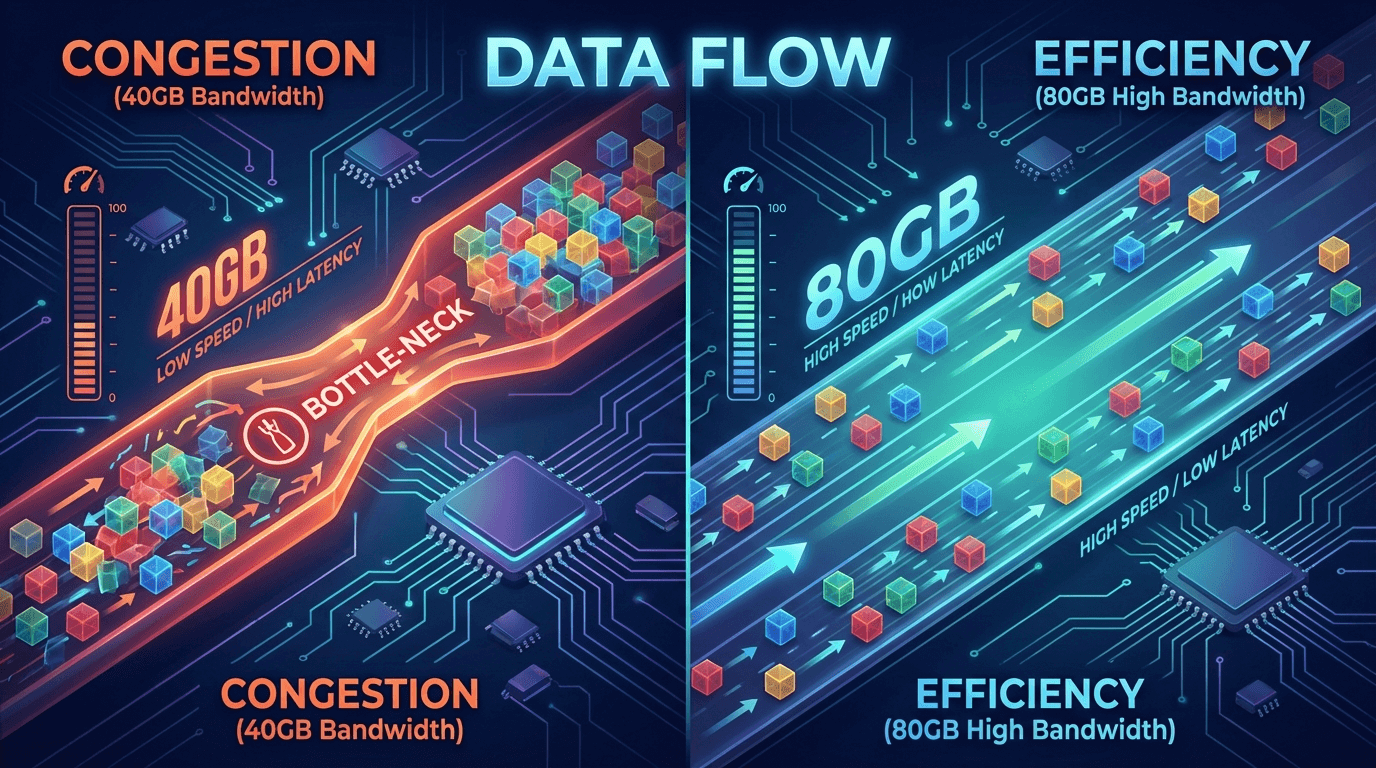
The fundamental difference between these two cards isn’t just capacity; it’s bandwidth and longevity. While the NVIDIA A100 40GB utilizes HBM2 memory with 1.6 TB/s bandwidth, the 80GB version upgrades to HBM2e, boosting bandwidth to over 2 TB/s.
But when does the 40GB capacity actually break?
- Gradient Checkpointing Overhead: In deep learning training, you store activations to compute gradients. When VRAM fills up, frameworks like PyTorch must offload data to the CPU (System RAM) or SSD. This “swapping” kills performance, turning a 2-day training run into a 2-week ordeal.
- The “Out of Memory” (OOM) Wall: For models utilizing 3D segmentation (medical imaging) or long-context LLMs (like GPT-4 iterations processing 128k context windows), a single batch of data might exceed 40GB. In these cases, the 40GB card cannot run the task at all, regardless of speed.
Model Size Thresholds Requiring 80GB
To make an informed decision, you need to match your hardware to your model architecture. Here is the breakdown based on FP16 (half-precision) training requirements:
- BERT-Large / ResNet-50: These models comfortably fit on a 40GB A100. You can achieve excellent saturation and training speeds without needing the extra memory.
- Llama-3 (8B – 13B Parameters): This is the transition zone. You can fine-tune these on 40GB cards using techniques like LoRA (Low-Rank Adaptation) or quantization. However, full-parameter training will struggle.
- GPT-NeoX / Llama-3 (70B+) / Mixtral: These are the realm of the 80GB A100. Loading the weights alone for a 70B model requires ~140GB in FP16. To train these, you not only need 80GB cards, but you also need multiple of them interconnected via NVLink in a GPU Server environment.
Verdict: If your roadmap includes Large Language Models (LLMs) with over 30 billion parameters, the 40GB card is obsolete for training purposes.
A100 40GB vs 80GB: Batch Size Impact Analysis
Batch size—the number of training examples processed in one pass—is crucial for model convergence and hardware efficiency.
A larger batch size stabilizes the gradient descent, leading to smoother and faster convergence. The A100 80GB allows you to practically double the batch size compared to the 40GB version.
- Scenario: Training a Vision Transformer (ViT).
- A100 40GB: Forced to use a micro-batch size of 16 to fit in memory. Tensor cores sit idle 30% of the time waiting for memory fetches.
- A100 80GB: Can handle a batch size of 32 or 64. Tensor utilization hits 98%, effectively cutting total training time by 40-50%.
High utilization means you are getting maximum value from your electricity and hardware lifespan.
Multi-GPU 40GB Alternatives
A common question we receive at ITCTShop is: “Is it better to buy two A100 40GB cards instead of one A100 80GB?”
The answer is nuanced.
- Pros: Two 40GB cards give you double the compute (Tensor Cores) and a combined 80GB of memory.
- Cons: You introduce communication overhead. Data must travel between GPUs via NVLink or PCIe. While NVLink is fast (600 GB/s), it is still slower than the internal HBM2e memory bandwidth (2000 GB/s) of a single 80GB card.
Strategy: For “Data Parallelism” (training small models faster), two 40GB cards are superior. For “Model Parallelism” (fitting one giant model that doesn’t fit on one chip), a single 80GB card (or multiple 80GB cards) is the only viable path.
ROI Calculation: Cost Per Training Run
The sticker price of the 80GB card is higher, but the Total Cost of Ownership (TCO) often favors it for heavy users.
Let’s assume a hypothetical training run takes 100 hours on an A100 40GB. Due to higher bandwidth and larger batch sizes, the A100 80GB might complete the same task in 65 hours.
If you are a cloud provider or a research lab running 24/7, that 35% time saving translates directly to:
- Lower electricity bills (less time running cooling and Server Components).
- Faster time-to-market for your AI product.
- Ability to run more experiments per month.
Over a 3-year lifecycle, the premium paid for the 80GB card is usually recovered within the first 6 months of intensive training.
Use Case Decision Tree
Still undecided? Use this simple logic flow:
-
Are you doing Inference only?
- Yes, for small models -> A100 40GB (or even L40S).
- Yes, for massive LLMs -> A100 80GB (to fit the context window).
-
Are you doing Training?
- Classical CV/NLP (ResNet, BERT) -> A100 40GB offers better value.
- Generative AI / LLMs / Foundation Models -> A100 80GB is mandatory.
-
Do you have limited rack space?
- Yes -> A100 80GB provides maximum density per slot in your Workstation.
Rental vs Purchase Consideration
For short-term projects (1-2 months), renting cloud GPU instances is viable. However, with the scarcity of H100s and A100s in the cloud market, availability is spotty and prices fluctuate.
Purchasing your own hardware ensures data privacy (crucial for finance and healthcare in the Middle East) and guarantees availability. Building an on-premise cluster with Data Center Solutions provides a fixed cost structure, which is vital for long-term R&D budgeting.
Conclusion
The A100 80GB is not just a “capacity upgrade”; it is a bandwidth beast that unlocks the capability to train the modern generation of AI models. While the A100 40GB remains a competent workhorse for specific, smaller-scale tasks, the 80GB variant is the future-proof investment for any serious AI infrastructure.
If your organization is looking to deploy high-performance computing infrastructure in the MENA region, ITCTShop is your trusted partner. Located in Dubai, we stock authentic NVIDIA enterprise GPUs and custom server solutions ready for immediate deployment. Whether you need a single accelerator or a full rack integration, our team can guide you to the right choice.
Expert Quotes
“In 90% of our LLM client deployments, the A100 40GB hits a memory wall before it hits a compute limit. The 80GB variant effectively extends the useful life of the server by another 2-3 years.” — Head of Data Center Solutions
“We typically advise against the 40GB cards for training clusters unless the budget is extremely tight. The operational efficiency lost due to smaller batch sizes often costs more in electricity and engineer time than the hardware savings.” — Lead AI Systems Engineer
“For inference-only edge nodes, the 40GB A100 is still a champion. It delivers the same Tensor Core performance as the bigger sibling, provided the model fits in memory.” — Senior Hardware Procurement Specialist
Last update at December 2025